How to Split a Restaurant Bill (Evenly or by Items)
Updated July 7, 2026 · by Oguz Yildiz
There are only two honest ways to split a restaurant bill: evenly, or by what each person actually ordered. Everything else — vibes, seniority, “I’ll get the next one” — is a deferred version of one of those two. The good news is that the fair, itemized version stopped being tedious the moment phones learned to read receipts. Here is how to handle every configuration, including the awkward ones.
First, pick your rule before the food arrives
Most bill friction is not about money; it is about surprise. A ten-second agreement when you sit down — “split evenly?” or “everyone pays their own?” — removes the entire end-of-meal negotiation. Groups that eat together often usually converge on a default. If nobody raises it, whoever grabs the check first gets to propose the rule.
When splitting evenly is right
Even splits work when orders are similar in size, when the group shares most dishes family-style, or when the total is small enough that fairness costs more than it is worth. One caveat: drinks. A table where half the group drinks wine and half drinks water is the single most common case where “evenly” quietly becomes unfair — the standard fix is splitting food evenly and drinks by consumer.
How to split by items (the fair way)
- Get one receipt for the table. Separate checks from the kitchen solve the problem upstream, but many restaurants cap or refuse them for large groups.
- Assign every line to a person. Duplicates matter: “2 × IPA” needs an owner for each.
- Divide shared items among sharers only. The appetizer three of you touched is not the whole table’s problem.
- Distribute tax and tip proportionally. Each person pays extras in proportion to their subtotal — the step everyone skips when doing this on a phone calculator, and the step a proper bill split calculator automates.
- Round up, not down. Leftover cents go to the tip. Nobody has ever resented a split for being 40 cents generous.
Doing all of that in the BillSplit app
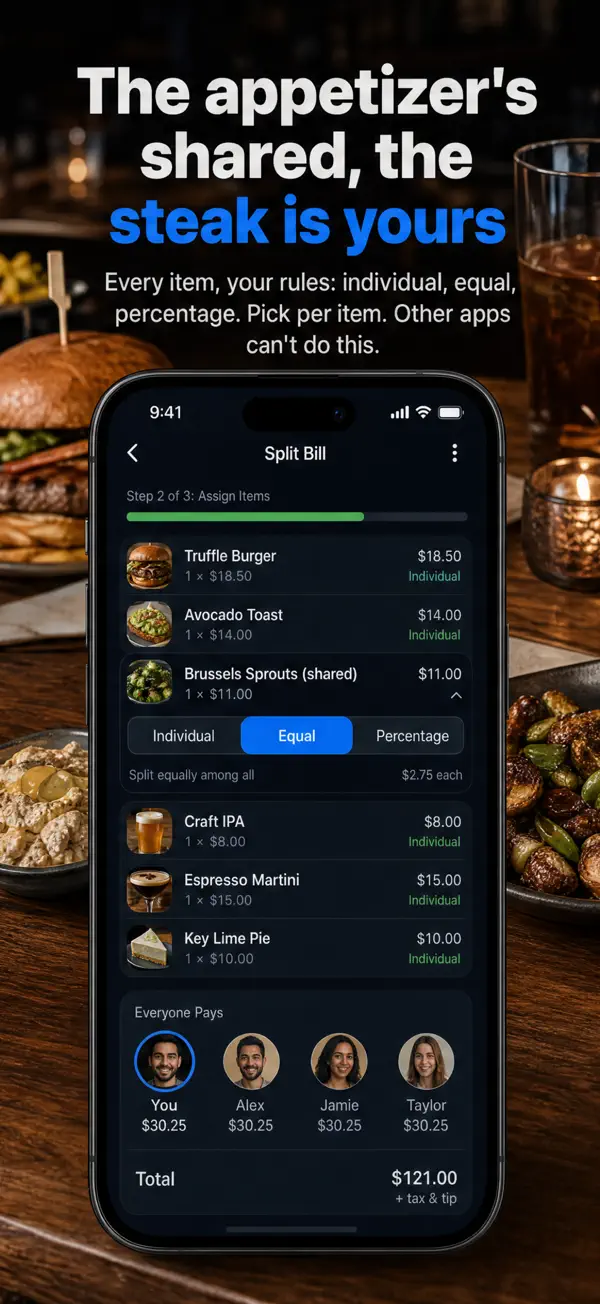
BillSplit compresses the five steps above into about thirty seconds:
- Scan the receipt. The AI extracts every item, price, and quantity from a photo — including messy thermal-paper prints.
- Tap items onto people. Add the people at the table, then assign each dish. Mark shared plates as equal or percentage splits; the steak stays with its owner.
- Show the screen to the table. Everyone sees their own number with tax and tip already distributed. Settle in cash or your payment app of choice — BillSplit stays out of your wallet.
The awkward cases, handled
- The birthday guest: assign their items to the group as a percentage split — everyone absorbs an equal slice of the honoree’s meal.
- The couple paying as one: add them as a single person and assign both plates there.
- The friend who left early: their items are already assigned; the app shows their share — screenshot it and send it their way.
- The “I only had a bite” negotiator: percentage split on the contested dish. Ten percent of a $14 plate is $1.40; the argument is rarely worth more than that.
Related questions
Is it rude to ask to split the bill by items?
Less rude than resenting an even split in silence. The etiquette shift is real: itemized splitting is now the norm among younger diners, and doing it with an app removes the part that used to be rude — making the table wait while someone does arithmetic.
Should tip be split evenly even if food is itemized?
Proportional is the consistent answer: if you pay 40% of the food, you pay 40% of the tip. BillSplit applies this automatically so the question never reaches the table.
What if we need a running tab across many dinners?
Then you want a ledger app — that is a different tool with different trade-offs. Our comparison of Splitwise alternatives explains when a debt tracker helps and when it is overkill.